RAG Explained Simply: Build an AI That Talks to Your Own Data
I explain how Retrieval-Augmented Generation works from embeddings to the retrieval step, then show a minimal TypeScript pipeline that chunks, stores, and retrieves your own documents before calling the LLM.
The LLM your team uses right now is trained on a significant chunk of the internet. It knows how sorting algorithms work, can explain TCP handshakes, and has read far more about JavaScript frameworks than most developers ever will.
It doesn’t know what’s in your product documentation. It doesn’t know what your team decided last Tuesday, what’s in the company Notion, or what changed in your API after its training cutoff. Ask it about anything private or recent and it’ll either guess confidently or admit it doesn’t know — and there’s no reliable way to tell which.
That gap is exactly what Retrieval-Augmented Generation addresses. RAG is how you give an LLM access to your own data without retraining anything. I’m going to show you how it actually works — starting with the part that confused me most the first time, which is how a database can search by meaning rather than exact text — and walk through a working TypeScript implementation from document storage to answer.
On this page
- What the model can’t know
- Embeddings: how meaning becomes a number you can search
- The four steps of a RAG pipeline
- A minimal retrieval chain in TypeScript
- What goes wrong and why it’s hard to spot
- RAG or fine-tuning: a simple decision rule
- Stop asking the model to remember things
What the model can’t know
There are two hard limits that make a raw LLM awkward for domain-specific questions.
Training cutoff. Every model has a date past which it learned nothing. Anything that happened since — a new API version, a pricing change, a security patch — the model wasn’t trained on it and genuinely has no information.
Private data. The model was never trained on your internal wiki, your support ticket history, your product changelog, or your codebase. There’s no version of any public model that learned your company’s specific context.
The obvious workaround is to paste the relevant documents into every prompt. This works for small documents, but it has a ceiling: context windows have limits, and sending 50,000 words of documentation with every message burns through tokens quickly and still breaks on long conversations. RAG solves this more precisely — you store everything in a vector database, retrieve only the 3-5 chunks that are actually relevant to each question, and inject just those into the prompt. The model sees what it needs, nothing more.
Embeddings: how meaning becomes a number you can search
Here’s the part that seems like magic before you see the mechanism.
A text embedding is a list of floating-point numbers — a vector. An embedding model converts any string of text into a vector by placing it in a high-dimensional coordinate space where semantically similar text ends up near each other. OpenAI’s text-embedding-3-small model produces a vector with 1,536 numbers. text-embedding-3-large produces 3,072.
The distance between two vectors represents how related the text is. The standard measure is cosine similarity: the cosine of the angle between the two vectors. OpenAI’s embedding models return normalized vectors, which means computing cosine similarity reduces to taking their dot product — no square roots needed.
What this buys you in practice: “How do I reset my password?” and “steps to recover account access” end up close together in vector space, even though the two phrases share no words. A keyword search would miss that match entirely. An embedding search catches it.
When you store a document chunk as an embedding, you’re storing its meaning as coordinates. When a user asks a question, you embed that question using the same model and find which stored coordinates are nearest. Those coordinates map back to the chunks whose meaning most closely matches the question.
Try this
- Install the
openaipackage:npm install openai.- Call
openai.embeddings.create({ model: "text-embedding-3-small", input: "How does authentication work?" }).- Log the length of
response.data[0].embedding.Expected result:
1536— a list of 1,536 floating-point numbers encoding the meaning of your input string.
The four steps of a RAG pipeline
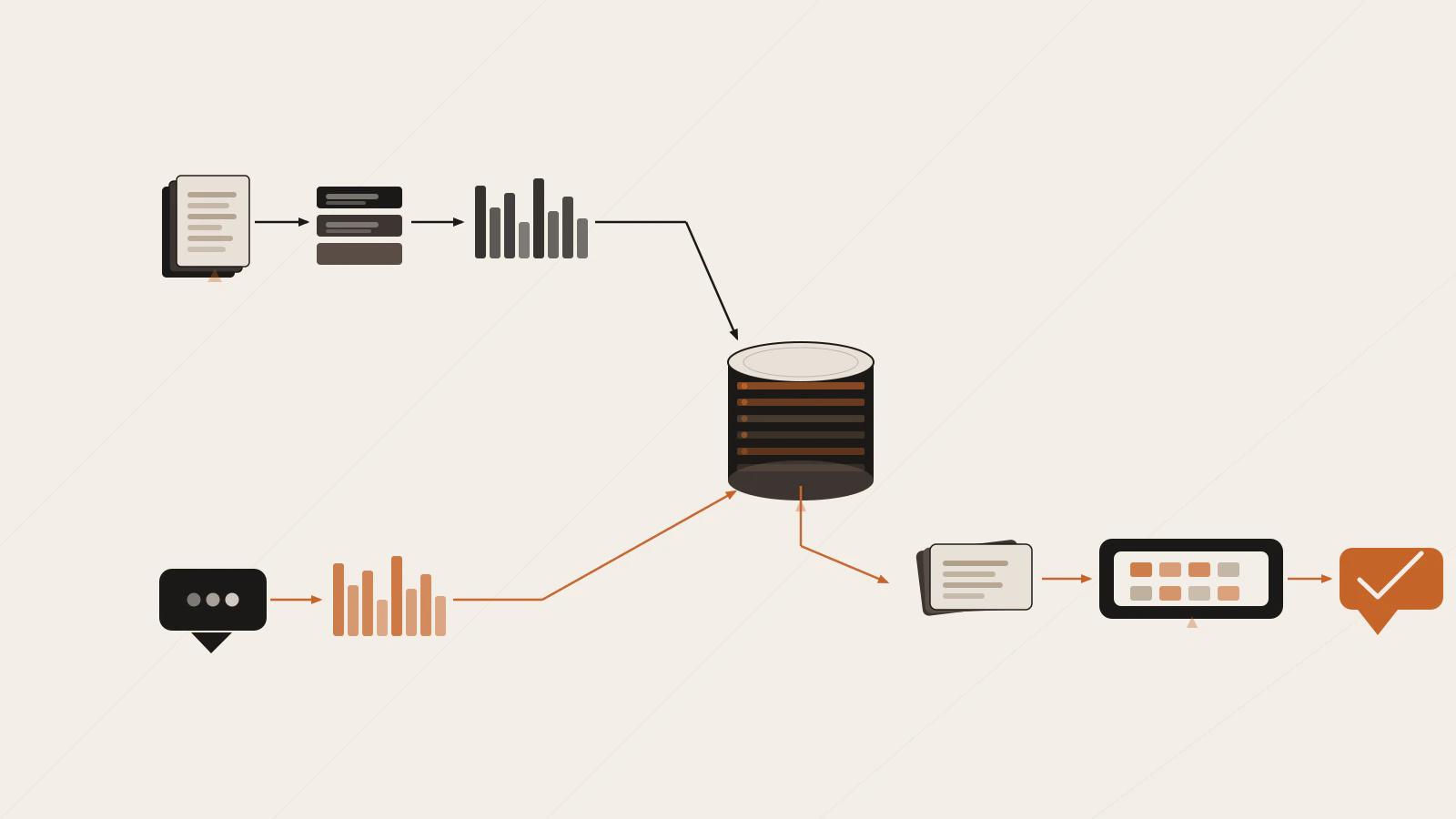
RAG has two phases. The indexing phase runs once, offline. The retrieval phase runs on every query.
Indexing:
- Chunk your documents. Split each document into overlapping pieces — typically 300 to 600 tokens per chunk, with 50 to 100 tokens of overlap between adjacent chunks. The overlap keeps sentences that fall on a boundary from being split across two separate chunks.
- Embed each chunk. Call the embedding API on each chunk and save the vector alongside the original text.
- Store in a vector database. pgvector (a PostgreSQL extension) stores these vectors in a way that makes similarity search fast at scale. Dedicated vector databases exist too, but pgvector is a practical starting point if you already run Postgres.
Retrieval (at query time):
- Embed the user query using the same model you used during indexing. This is the most frequently skipped step when switching models — if you upgrade your embedding model, you need to re-index everything.
- Retrieve the top-k nearest chunks. Query the database for the k chunks whose vectors are closest to the query vector — typically 3 to 5.
- Build the context-stuffed prompt and call the model. Inject those chunks into the prompt, then call
chat.completions.create. Your system prompt should tell the model to answer from the provided context only. Without that instruction, the model silently blends retrieved content with training data and you can’t tell the difference.
A minimal retrieval chain in TypeScript
Here’s a working implementation using the openai npm package and pgvector on PostgreSQL. You’ll need the pg client, the openai package, and DATABASE_URL and OPENAI_API_KEY environment variables. If you haven’t worked with PostgreSQL before, PostgreSQL for developers covers the setup. For the Express server that hosts the endpoint calling this, REST API with Node.js and Express has that foundation.
First, create the table:
// setup.ts
import { Client } from 'pg';

const db = new Client({ connectionString: process.env.DATABASE_URL });
await db.connect();

await db.query('CREATE EXTENSION IF NOT EXISTS vector');
await db.query(`
  CREATE TABLE IF NOT EXISTS documents (
    id        SERIAL PRIMARY KEY,
    content   TEXT    NOT NULL,
    embedding vector(1536)
  )
`);
Embed a document chunk and store it:
import OpenAI from 'openai';

const openai = new OpenAI(); // reads OPENAI_API_KEY from process.env automatically

async function storeChunk(text: string): Promise<void> {
  const { data } = await openai.embeddings.create({
    model: 'text-embedding-3-small',
    input: text,
  });

  await db.query(
    'INSERT INTO documents (content, embedding) VALUES ($1, $2)',
    [text, JSON.stringify(data[0].embedding)]
  );
}
Then the retrieval and answer step:
async function ask(question: string): Promise<string> {
  // Embed the question — must use the same model as indexing
  const { data } = await openai.embeddings.create({
    model: 'text-embedding-3-small',
    input: question,
  });

  // <=> is pgvector's cosine distance operator — lower value = more similar
  const { rows } = await db.query<{ content: string }>(
    `SELECT content
     FROM documents
     ORDER BY embedding <=> $1
     LIMIT 3`,
    [JSON.stringify(data[0].embedding)]
  );

  const context = rows.map(r => r.content).join('\n\n');

  const chat = await openai.chat.completions.create({
    model: 'gpt-4o-mini',
    messages: [
      {
        role: 'system',
        content:
          'Answer questions using only the provided context. ' +
          'If the context does not contain the answer, say so.',
      },
      {
        role: 'user',
        content: `Context:\n${context}\n\nQuestion: ${question}`,
      },
    ],
  });

  return chat.choices[0].message.content ?? '';
}
Three details worth pausing on:
<=> is cosine distance, not cosine similarity. It returns 1 - cosine_similarity, so lower values mean closer matches. ORDER BY embedding <=> $1 LIMIT 3 gives you the three chunks whose meaning is most similar to the question.
Use the same model for indexing and querying. Different embedding models produce incompatible vector spaces — the similarity scores between a text-embedding-3-small stored vector and a text-embedding-3-large query vector are meaningless. If you switch models, re-embed everything.
The system prompt is load-bearing. “Answer only from the provided context” stops the model from supplementing retrieved information with training memory. You can’t reliably detect that blending after the fact.
Check this before moving on
- You’re using the same embedding model for storing chunks and for querying
-
CREATE EXTENSION IF NOT EXISTS vectorruns beforeCREATE TABLE - Your system prompt explicitly limits the model to the provided context
What goes wrong and why it’s hard to spot
The most dangerous failure mode in a RAG system is a confident wrong answer. The model doesn’t say it couldn’t find anything relevant — it reads the retrieved chunks, even if they’re only tangentially related, and synthesizes something plausible.
The retrieval step failed silently. If the user’s question doesn’t embed closely to any stored chunk, the database returns the least-wrong results rather than nothing. The model receives mediocre context and still generates a confident response. You can debug this by logging the retrieved chunks and checking whether they actually contain the answer before sending them to the model.
Chunk size is off. Chunks larger than 1,000 tokens dilute the relevant sentence inside too much surrounding text. The model has to read through noise to find the answer. Chunks smaller than 100 tokens often split a complete fact across two entries — neither retrieved chunk contains enough context to answer alone. Start at 400 to 500 tokens with 50-token overlap, then adjust based on the structure of your documents.
k is wrong for your use case. LIMIT 1 cuts off related context that matters for complete answers. LIMIT 20 floods the model with marginally relevant content and dilutes the specific answer. Three to five chunks handles most cases well. Measure by logging the retrieved chunks and checking whether they contain the answer, not just whether the final response sounds right.
The indexing and querying models diverged. This is easy to introduce accidentally during an upgrade. Your stored vectors stay at the old model’s dimensionality. New queries produce distance scores that don’t correspond to actual similarity. Adding a model_version column to your documents table and checking it before querying catches this early.
RAG or fine-tuning: a simple decision rule
Both approaches adapt an LLM to your domain, but they work at different layers and solve different problems.
Fine-tuning changes the model’s weights. It’s the right tool when you want the model to adopt a specific writing style, consistently follow a domain-specific response format, or understand specialized terminology. The trade-off: updating the training data requires retraining, which takes time and labeled examples.
RAG doesn’t change the model at all. It changes the information the model receives at inference time. Updating your knowledge base is as simple as re-embedding some documents — no training run, no labeled data needed.
| What you’re trying to do | Better approach |
|---|---|
| Give the model access to private documents | RAG |
| Keep answers current with recent events | RAG |
| Update knowledge without a training run | RAG |
| Teach the model a specific response format | Fine-tuning |
| Change the model’s consistent writing style | Fine-tuning |
For most product use cases — internal Q&A, document search, customer support bots — RAG is the right first move. Fine-tuning requires labeled training data, takes longer to iterate on, and is harder to debug when the underlying information changes. You’d typically reach for RAG first and add fine-tuning only when you’ve confirmed that the retrieval quality is solid and the remaining problem is behavioral.
Stop asking the model to remember things
The mental shift that makes RAG click: an LLM is a reasoning engine, not a database. It’s very good at reading a short context window and synthesizing a clear, accurate answer from it. It was never built to reliably recall specific facts from training data — asking it to remember the exact contents of your changelog is asking it to do something it’s not designed for.
RAG separates the storage problem from the reasoning problem. The database handles retrieval — something it’s built for. The model handles reading and synthesizing — the thing it’s good at. You stop fighting the model’s limits and start working with what it does well.
If you’ve already built a streaming chat app and want to add retrieval, the structure from How to Build Your First AI-Powered App with React, Node.js, and OpenAI maps directly. The ask() function slots between receiving the user’s message and calling chat.completions.create — the streaming code stays the same. If you’re thinking about the bigger picture of what AI tools mean for engineering, AI Won’t Replace Software Developers covers that with more nuance than most.
Indexing stores document chunks as vectors. At query time, the question is embedded, the closest chunks are retrieved, and the model generates an answer from that context.