Vite vs Webpack: Why Developers Are Moving Away from Webpack
I explain why webpack's bundle-first approach gets slow at scale and how Vite's native ESM model changes the dev server experience for most projects.
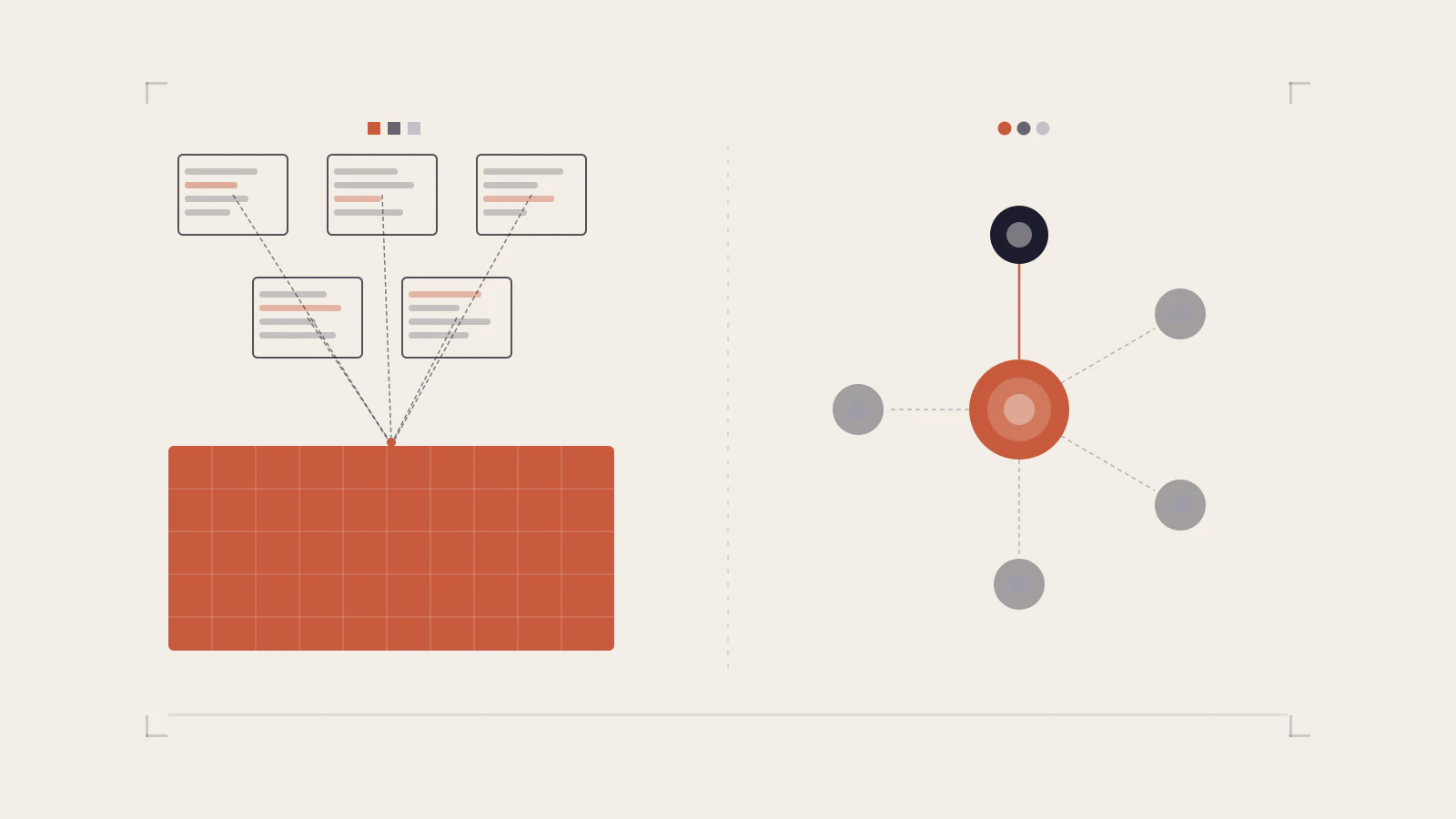
webpack powered most of the JavaScript ecosystem for nearly a decade. Create React App used it. Angular CLI used it. Vue CLI used it. It solved a real problem — browsers couldn’t load modules the way Node.js did, so something had to bundle everything first.
Then browsers gained native ES module support. The reason webpack existed became less compelling. And Vite built a dev server around that fact.
The State of JavaScript 2024 survey showed webpack and Vite nearly tied in professional usage — 7,927 teams using webpack at work versus 7,909 using Vite. That’s not a trend in early stages. That’s a crossover happening in real time.
This post explains what actually changed under the hood, why the switch is worth it for most projects, and the situations where webpack still makes more sense.
On this page
- The model that powered a decade
- What Vite does instead
- Where the difference shows up in practice
- The ecosystem has voted
- When webpack still wins
- Migration: the friction points to know
- Choose based on what your project actually needs
The model that powered a decade
webpack reads your entry point, traces every require() and import(), builds an internal dependency graph of every file your app touches, transforms all of it, and produces bundles for the browser to load. It does this every time you start the dev server.
That model made sense in 2014. Browsers didn’t understand import statements. CommonJS was the standard. You needed something that would resolve require('./utils'), handle CSS imports, inline images, run Babel transforms, and spit out a JavaScript file a browser could actually execute.
The configuration that comes with all this flexibility is substantial. If you’ve worked with a webpack.config.js at a mature company, you know what I mean — entry points, output configuration, loader chains, plugin stacks, resolve aliases, cache settings, and optimization rules, all before the dev server starts. The State of JavaScript 2024 survey listed “configuration” as the top build tools pain point, with 379 respondents flagging it.
The bundling step itself is why dev server startup is slow. webpack must build the entire bundle before it can serve anything. On a small project this is fast. On a project with hundreds of modules, startup can take 20 or more seconds — and that timer restarts on every cold start.
What Vite does instead
Vite’s fundamental move was to stop bundling source code during development. Instead, it uses native ES modules — the import statement that modern browsers have understood since around 2017.
When you start the Vite dev server, it doesn’t bundle your application. It registers an HTTP server and waits. When the browser loads your entry HTML file and encounters <script type="module">, it follows the import graph one file at a time, making individual HTTP requests. Vite intercepts each request, transforms just that file on demand — TypeScript to JavaScript, JSX to JS — and returns it. The browser only loads what it actually needs for the current route.
The practical effect: dev server startup is nearly instant regardless of application size.
Dependencies in node_modules are handled differently. Third-party packages often use CommonJS, which browsers can’t load natively. Vite pre-bundles these once using Rolldown (a Rust-based bundler that now powers Vite’s toolchain), caches the result in node_modules/.vite/deps, and serves them as proper ES modules. A cold start with changed dependencies has a cost; a restart of your own application code does not.
HMR works on the same principle. When you change a file, Vite updates only that module — it doesn’t rebuild a bundle. The Vite documentation states that HMR updates can reflect in the browser in under 50ms for TypeScript files.
// vite.config.js — a complete React + TypeScript project
import { defineConfig } from 'vite'
import react from '@vitejs/plugin-react'

export default defineConfig({
  plugins: [react()],
})
That’s the entire config for a React app with TypeScript, JSX, CSS modules, and HMR. webpack requires considerably more to reach the same starting point.
Where the difference shows up in practice
The architectural gap is most visible in three situations.
Large codebases. webpack’s bundle-first model means startup time scales with project size. A project with hundreds of modules has overhead that grows with each file added. Vite’s on-demand model doesn’t have this property — startup stays fast regardless of how many files exist, because only the files the browser requests get transformed.
Tight feedback loops. HMR speed is the single biggest day-to-day quality-of-life difference. In a webpack project, editing a deeply nested component means webpack invalidates and rebuilds part of the module graph before the browser updates — this can take 500ms to several seconds depending on project structure. Vite’s HMR operates at the ESM level: only the changed module and its boundary get updated, without touching the surrounding graph.
Onboarding new developers. A developer cloning a Vite project can be running it in seconds. The same experience on a heavily configured webpack project often includes a compile step before anything appears. When that matters a few times a week across a team, it adds up.
Check this before moving on
- Vite skips bundling during development, not during production builds
- Production builds use Rollup/Rolldown — the output is equivalent to webpack’s
- Pre-bundled dependencies live in
node_modules/.vite/depsand rebuild only when they change
The ecosystem has voted
Framework teams have been making this choice for their users for several years. Nuxt, SvelteKit, Astro, React Router, Analog, and SolidStart all built their toolchains on Vite. Vitest runs on Vite’s transform pipeline. Storybook uses Vite by default for supported frameworks.
The 2024 State of JavaScript data shows the practical effect. webpack and Vite are nearly tied in professional usage today — but Vite’s usage has been growing consistently year over year while webpack’s has been flat. The survey also called out Rspack as a notable new entrant that “jumped right into being adopted by large companies” by positioning itself as a webpack-compatible, Rust-powered drop-in replacement.
This ecosystem shift matters beyond tooling preference. When you hit a problem in your build setup, the community actively developing Vite, its plugins, and its associated tools is more active than the webpack community has been in recent years. New framework features and optimisations flow faster.
When webpack still wins
The comparison isn’t one-sided. There are real reasons to stay on webpack.
Module Federation. This is webpack’s clearest unique advantage. Module Federation lets you load chunks from separate, independently deployed applications at runtime — the foundation of most micro-frontend architectures. The host app loads a remote app’s components as if they were local, with shared singleton dependencies handled automatically. Vite doesn’t support Module Federation natively. Third-party plugins exist, but they don’t cover all of webpack’s Module Federation use cases, particularly around shared singletons and bidirectional hosting. If you’re maintaining a micro-frontend platform, this consideration can outweigh everything else.
Complex custom configurations. webpack’s loader and plugin system has been around long enough to have solutions for unusual requirements — custom module resolution, experimental format outputs, integration with legacy build pipelines, and specialised transforms. If your webpack.config.js has 300+ lines of custom logic, migration requires verifying that every piece of that behaviour can be reproduced in Vite’s model. Sometimes it can. Sometimes the effort isn’t worth the gain.
Rspack as a middle option. If you need webpack compatibility but want better performance, Rspack is worth evaluating. It’s API-compatible with webpack 5 — most projects can swap in Rspack with minimal config changes — and it’s significantly faster due to its Rust-based implementation.
| Your situation | Better fit | Reason |
|---|---|---|
| New project, standard framework | Vite | Faster DX, smaller config, framework alignment |
| Existing project, simple webpack config | Vite (migrate) | Migration is usually straightforward |
| Existing project, Module Federation | webpack (stay) | No full Vite equivalent |
| Existing project, complex custom config | Evaluate carefully | Migration cost may exceed the benefit |
| Need webpack semantics with better speed | Rspack | Drop-in replacement path |
Migration: the friction points to know
For standard React or Vue apps, most migrations from webpack to Vite take a day or less. The conceptual shift is the hardest part.
webpack accepts CommonJS patterns everywhere — require(), module.exports, __dirname. Vite’s dev server assumes ES modules. If your source files use require() directly or import CommonJS-only packages that don’t have an ESM build, you’ll need to update them. import.meta.url replaces __dirname; static import replaces require().
Config syntax is completely different. webpack’s module.rules array with loader chains has no direct translation. Vite uses a plugins array where each plugin handles a feature area. For TypeScript, JSX, CSS modules, Sass, and PostCSS, Vite handles them natively or with a single plugin — the resulting config ends up much smaller.
Some webpack loaders have no direct Vite equivalent. If you’re using file-loader, url-loader, or raw-loader, Vite’s ?url, ?raw, and ?inline URL query suffixes cover most of those cases. For specialised loaders that process custom file formats, you’d write a Vite plugin.
A practical first step when evaluating migration: look at how many lines your webpack.config.js has and how many custom loaders it uses. Under 100 lines with standard loaders — straightforward. Over 300 lines with custom transforms — budget the time to investigate properly before committing.
Choose based on what your project actually needs
Vite is the better default for new projects and for existing projects where webpack’s config is standard. The dev server speed, the smaller config surface, and the framework ecosystem alignment are real advantages. The State of JavaScript 2024 data confirms this isn’t a niche preference — it’s where the industry has moved.
But “faster by default” isn’t a reason to rush a migration when your project uses Module Federation, has heavily customised webpack configuration, or uses loaders with no Vite equivalent. The friction of migrating that work can easily cost more than the time saved from faster HMR.
The decision is simpler than it looks: if you’re starting fresh or have a standard webpack setup, switch to Vite. If your project uses Module Federation or has significant custom loader logic, the migration cost may not be worth the gain — stay on webpack or evaluate Rspack.
Browsers now speak ES modules natively, and Vite builds on that fact instead of working around it. For most frontend projects that means faster starts, faster edits, and less config. If you want to understand the rendering side of React performance once your build is fast, the post on slow React components and how to fix them is a natural next step. And if TypeScript for JavaScript developers is still something you’re navigating, that’s worth reading alongside this.