Rebuilding a React App with Vite: Is It Actually Faster?
I compare Vite's native ESM dev server to the bundle-first approach of webpack, explain the real performance difference, and walk through migrating from CRA step by step.
There’s a specific kind of frustration that creeps into a React project somewhere around the six-month mark. You hit save and wait. Not long — maybe three or four seconds — but long enough to break your concentration every single time. The dev server used to feel instant. Now it doesn’t.
This is the problem Vite was built to solve, and it solves it by doing something genuinely different rather than just doing the same thing faster. Whether that difference is worth a migration is a real question with a real answer, so let’s work through it.
Quick take: Vite is faster because it doesn’t bundle your code during development at all. Your source files are served as native ES modules and transformed on demand, one file at a time. The speed improvement is most noticeable on cold start and HMR in medium-to-large projects. Migration from CRA is around 30 minutes of mechanical steps.
On this page
- Why webpack-based tools slow down as your project grows
- How Vite’s dev server actually works
- What the speed difference looks like in practice
- Migrating from Create React App: the actual steps
- What changes after you switch
- When Vite might not be the right fit
- Is the migration worth it?
Why webpack-based tools slow down as your project grows
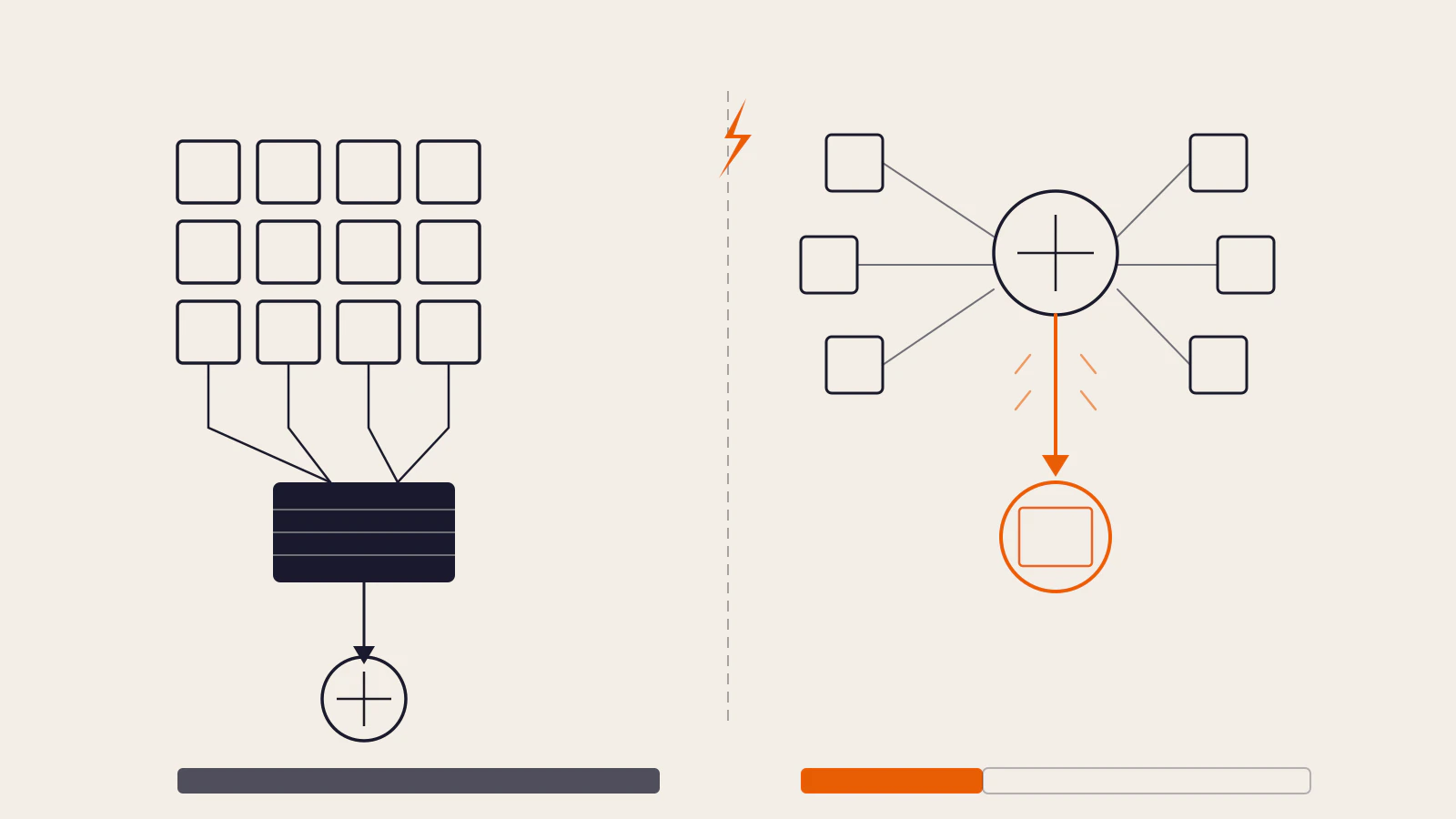
Create React App uses webpack under the hood. When you run npm start, webpack reads your entry point (index.js), builds a complete dependency graph of every module in your project, transpiles everything with Babel, stitches it together into one or more bundles, and only then hands that bundle to a dev server to serve.
This process has to be largely repeated every time you change a file. webpack uses an internal cache and incremental rebuilds to avoid doing everything from scratch, but it still needs to re-process the changed file and update the bundle. The larger the dependency graph, the more work that is — and there’s no architectural way around it.
For a small app with 50 files, you don’t feel this. For a project with 300 files and a dozen libraries, every save becomes a small but real delay. Projects that use many dependencies or have complex re-exports are hit harder.
This is not a bug in webpack or CRA. It’s the consequence of the design: you build the whole thing, then serve it. That trade-off made total sense when native ES modules weren’t widely supported in browsers. Now they are.
How Vite’s dev server actually works
Vite splits the problem into two categories and handles each differently.
Dependencies — the packages in node_modules that rarely change — are pre-bundled once when you first start the dev server. Vite uses esbuild for this step. esbuild is written in Go and benchmarks show it bundles dependencies 10 to 100 times faster than JavaScript-based bundlers like webpack. After the first run, the pre-bundled output is cached on disk. Unless you add a new dependency or delete the cache, this step only runs once.
Your source code — the files you actually edit — is never bundled during development. Instead, Vite starts a dev server and waits. When the browser requests a module (because the browser parsed an import statement and followed it), Vite intercepts that request, transforms just that one file, and returns it. The browser handles the module graph itself by following import chains and making HTTP requests for each one.
The practical result is that Vite’s dev server starts almost immediately regardless of how large your project is. There’s nothing to bundle upfront.
When you edit a file, Vite’s Hot Module Replacement works the same way — it only needs to invalidate and re-serve the single changed module. Per the Vite features documentation, HMR updates reflect in the browser in under 50ms because the Oxc transformer processes one file at a time, not an entire graph.
Bundle-first on the left: all modules merge into one block before serving. On-demand on the right: each module travels directly to the browser as it’s requested.
What the speed difference looks like in practice
The improvement is most noticeable in three areas.
Cold start. With webpack, the dev server isn’t ready until the entire bundle is assembled. With Vite, the server is ready the moment dependencies are pre-bundled (or immediately on subsequent starts, since those are cached). For large projects, this difference can be dramatic — though the exact number depends on your dependency count, machine speed, and project structure, so I’ll point you to your own stopwatch rather than cite a number for a project that isn’t yours.
HMR speed. This is where the architectural difference is most felt day-to-day. In webpack, an HMR update can require traversing the module graph to find what needs to change. In Vite, it’s a single-file transform. The documented target is under 50ms. For components that have costly module trees above them, the difference in perceived responsiveness is significant.
Build time. Vite uses Rollup (or Rolldown in newer versions) for production builds, which are still bundled — that’s necessary for efficient production delivery. Production build speed is better than webpack-based CRA, but the gap is smaller than it is on dev server startup, and it matters less since you’re not running production builds dozens of times a day.
Worth noting: React.dev itself no longer recommends Create React App. Their current guidance recommends Vite, Parcel, or Rsbuild for building without a framework. CRA is no longer actively maintained.
Migrating from Create React App: the actual steps
If you have an existing CRA project, migration is mechanical. It typically takes 20–40 minutes depending on project size. Here’s what you’re doing at each step.
1. Swap the dependencies.
Remove react-scripts from dependencies and add Vite and the React plugin to devDependencies:
npm uninstall react-scripts
npm install -D vite @vitejs/plugin-react
2. Update your scripts in package.json.
{
  "scripts": {
    "dev": "vite",
    "build": "vite build",
    "preview": "vite preview"
  }
}
3. Move index.html to the project root.
CRA keeps index.html in the public/ folder. Vite expects it at the root. Move it, then remove every %PUBLIC_URL%/ prefix from the link paths inside it:
# Before
<link rel="icon" href="%PUBLIC_URL%/favicon.ico" />

# After
<link rel="icon" href="/favicon.ico" />
Also add a module script entry point just before the closing </body> tag:
<script type="module" src="/src/main.jsx"></script>4. Rename .js files that contain JSX to .jsx.
Vite only transforms JSX in files with a .jsx or .tsx extension by default. Your entry file and any component files using JSX syntax need the correct extension.
5. Create a vite.config.ts at the project root.
import { defineConfig } from "vite";
import react from "@vitejs/plugin-react";

export default defineConfig({
  plugins: [react()],
});
6. Rename your environment variables.
CRA uses REACT_APP_ as a prefix for environment variables exposed to the browser. Vite uses VITE_. You’ll also need to replace process.env.REACT_APP_X with import.meta.env.VITE_X in your code:
# .env before
REACT_APP_API_URL=https://api.example.com

# .env after
VITE_API_URL=https://api.example.com
// Code before
const url = process.env.REACT_APP_API_URL;
// Code after
const url = import.meta.env.VITE_API_URL;After these changes, run npm install to clean up and reinstall, then npm run dev to test.
What changes after you switch
A few differences trip people up right after the migration.
No implicit src alias. CRA allowed bare imports like import Button from "components/Button". Vite doesn’t set up a src alias by default. You can configure one in vite.config.ts:
import { defineConfig } from "vite";
import react from "@vitejs/plugin-react";
import { resolve } from "path";

export default defineConfig({
  plugins: [react()],
  resolve: {
    alias: {
      "@": resolve(__dirname, "./src"),
    },
  },
});
TypeScript is transpile-only. Vite strips TypeScript types but does not run the type checker. This is intentional — type checking the whole graph at transform time would undermine the speed advantage. Run tsc --noEmit separately in CI or as a pre-build step. If you want type errors visible in the browser during dev, vite-plugin-checker handles that.
Path aliases in TypeScript need both places. If you add a resolve.alias in vite.config.ts, you also need the matching paths entry in tsconfig.json so TypeScript knows where to look:
{
  "compilerOptions": {
    "paths": {
      "@/*": ["./src/*"]
    }
  }
}
These are small adjustments rather than deep rewrites. If your project doesn’t use absolute imports or expose environment variables, you may not hit them at all.
If you’re building a new React app and want to understand the component fundamentals first, React Fundamentals: Components, Props, and State is a good foundation before diving into tooling concerns.
When Vite might not be the right fit
Vite targets modern browsers during development. If you need to support older browsers (IE11, for example), you’ll need the @vitejs/plugin-legacy plugin, which adds a compatibility layer but introduces some additional complexity.
Very large applications with hundreds of dependencies can sometimes hit a different kind of slowness in the browser: thousands of individual HTTP requests for unbundled modules on the first load. The Vite team is working on a “full bundle mode” that would bundle source code during development to address this — but it’s not released yet as of this writing.
If your project uses a Next.js-based setup with server components, the migration story is more involved. Vite doesn’t handle SSR, RSC, or routing — for those, Next.js App Router is the more complete solution. Vite is best suited to SPAs and apps where you control the server separately.
Is the migration worth it?
For a standard React SPA on CRA: yes. The dev experience improvement is genuine, it compounds daily, and the migration is a bounded afternoon of work. The fact that CRA is no longer maintained by the React team makes the case stronger.
I want to be honest about one thing, though: if your CRA project is small and you’re not feeling any slowness, the migration is optional comfort rather than a necessity. The benefit scales with project size. A ten-component app won’t feel much different. A project with dozens of routes, lazy-loaded chunks, and many dependencies absolutely will.
The deeper shift is in the model. Vite doesn’t speed up the same process — it replaces it. Once you’ve worked in a dev server that doesn’t bundle, going back to one that does feels like waiting for a fax machine.
For React performance once your app is running — not building — Finding and Fixing Slow React Components covers React.memo, useCallback, and when to skip memoisation entirely. The build tool gets you to fast iteration; the profiler gets you to fast execution.
Sources
- Why Vite — Vite official documentation
- Features — Vite official documentation
- Build a React app from Scratch — React.dev
- Vite 3.0 vs. Create React App: Comparison and migration guide — LogRocket Blog
- esbuild: An extremely fast bundler — esbuild.github.io
- Getting Started — Vite official documentation