Push Notifications in React Native: The Architecture Explained
I trace the full path a push notification takes from server to screen — APNs, FCM, the Expo push service — and show how to handle permissions, tokens, and messages in three different app states.
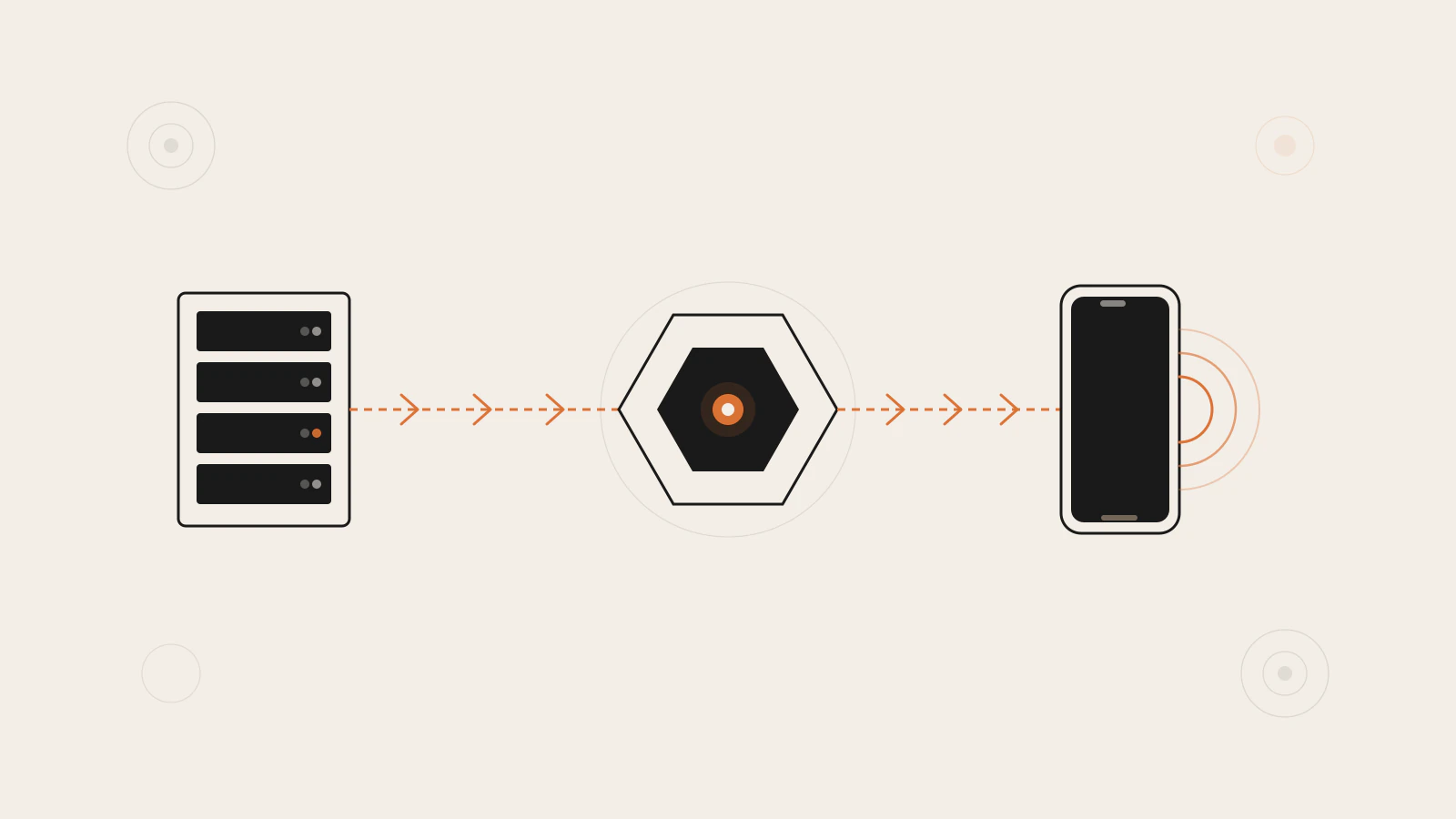
The button that sends a push notification looks deceptively simple — a title, a body, a token, a POST request. But between that API call and the banner appearing on a user’s screen, at least four separate systems coordinate: your server, a push provider, Apple’s or Google’s platform infrastructure, and the device’s operating system.
Most introductions skip that architecture and jump straight to the code. That’s fine until something breaks in production. A failed delivery could mean your server-side credentials expired, the platform gateway rejected the message, the device token is stale, or your notification handler is misconfigured. Without knowing what the chain looks like, all four possibilities look identical from the outside.
I’m going to trace the full delivery path, then show you how expo-notifications maps onto it — including how to handle the three different app states that change what happens when a notification arrives.
Series: Part 7 of 8 — React Native for React Developers. Part 1: Getting Started · Part 2: Navigation · Part 3: State Management
On this page
- How a notification reaches the device
- Permission and the push token
- Three app states, three different behaviors
- Scheduling notifications locally
- Putting data in the payload
- What breaks and why
- Think in layers when something goes wrong
How a notification reaches the device
Your server never talks directly to a user’s phone. Sending a push notification always routes through a platform-specific gateway: Apple Push Notification Service (APNs) for iOS, and Firebase Cloud Messaging (FCM) for Android. These gateways authenticate your server using credentials you configure, and then manage the actual delivery to the device.
The full path looks like this:
- Your server sends a request with a device token and message content
- The request goes to a push provider — either the Expo push service, or directly to APNs/FCM
- The provider routes to the correct platform gateway based on the token
- APNs or FCM delivers the notification to the device
- The device’s OS displays it and — optionally — wakes the app
The Expo push service sits between your server and the platform gateways. Instead of managing two authentication schemes and two API clients, you send everything to a single endpoint (https://exp.host/--/api/v2/push/send) using a single token format. Expo handles the routing. You can bypass this and talk to APNs and FCM directly if you need tighter control — the expo-notifications API is push-service agnostic — but the Expo layer removes a significant amount of credential management from your side.
The ExponentPushToken — a string in the format ExponentPushToken[xxxxxxxxxxxxxxxxxxxxxx] — is different from the native device push token that APNs or FCM issues. Expo maintains that mapping internally. You store the Expo-format token and send it to your server; your server passes it to the Expo push endpoint. You only interact with the lower-level native token if you go around the Expo service.
One thing worth understanding early: the Expo push service guarantees best-effort delivery to the platform gateway. If your server receives a push receipt showing the handoff to APNs or FCM succeeded, that means the gateway received the message — not that the device displayed it. The platform gateway applies its own delivery policies after that point, and those aren’t directly observable.
Permission and the push token
Before any of that delivery chain matters, two things need to happen on the device: the user must grant notification permission, and the app must register to get its push token.
On iOS, permission is never granted automatically. Your app must request it explicitly, and the user sees a system prompt. Android 13 (API level 33) added the same requirement — on earlier Android versions, permission was implicit at install. The expo-notifications API handles both platforms with a consistent interface.
Check for existing permission before prompting. Calling requestPermissionsAsync when permission is already granted is a no-op. But on iOS, once a user taps “Don’t Allow,” every subsequent call to requestPermissionsAsync returns denied silently — no prompt, no second chance. The only path back is the device’s Settings app. This is why asking at the wrong moment costs you:
import * as Notifications from 'expo-notifications';
import Constants from 'expo-constants';
import { Platform } from 'react-native';

async function registerForPushNotifications(): Promise<string | null> {
  // Android requires a notification channel before the permission prompt appears
  if (Platform.OS === 'android') {
    await Notifications.setNotificationChannelAsync('default', {
      name: 'default',
      importance: Notifications.AndroidImportance.MAX,
    });
  }

  const { status: existing } = await Notifications.getPermissionsAsync();
  let finalStatus = existing;

  if (existing !== 'granted') {
    const { status } = await Notifications.requestPermissionsAsync();
    finalStatus = status;
  }

  if (finalStatus !== 'granted') {
    return null; // user declined — handle gracefully in your UI
  }

  const projectId =
    Constants?.expoConfig?.extra?.eas?.projectId ??
    Constants?.easConfig?.projectId;

  const token = await Notifications.getExpoPushTokenAsync({ projectId });
  return token.data; // "ExponentPushToken[xxxxxxxxxxxxxxxxxxxxxx]"
}
The projectId connects the token to your specific EAS project, which keeps the token stable across app updates and account transfers. Send the returned string to your server and store it against the user’s record. That value is what your server uses whenever it wants to reach that device.
On Android, calling setNotificationChannelAsync before the permission request is required for some devices. Without it, the permission prompt can fail to appear correctly on Android 8+ (API level 26+), which introduced notification channels as a system requirement.
Three app states, three different behaviors
A notification arrives and your app could be in one of three states. Each behaves differently, and the code you write needs to cover all three. Missing any one of them is the source of “works on my device” bugs.
Foreground (app is active and visible)
By default, iOS suppresses notifications when the app is in the foreground — the assumption is that the user is already there. To override this, set a notification handler before any component mounts. This belongs at the module level, outside your component tree:
Notifications.setNotificationHandler({
  handleNotification: async () => ({
    shouldShowBanner: true,
    shouldShowList: true,
    shouldPlaySound: false,
    shouldSetBadge: false,
  }),
});
Android shows foreground notifications regardless of this handler, but setting it is still correct practice since it controls badge and sound behavior across both platforms.
Background (app is in the recents tray)
The OS handles display automatically. The user sees the banner and taps it, which brings the app back to the foreground. At that point, addNotificationResponseReceivedListener fires with the full response object, including the data payload your server attached.
Killed (app is not running at all)
This is the state most developers miss. When a user taps a notification that cold-launches the app, the response listener registered in a useEffect may not fire — the component hasn’t mounted yet when the tap triggers. Use getLastNotificationResponseAsync in your root component’s mount effect:
import { useEffect } from 'react';
import * as Notifications from 'expo-notifications';

export function useNotificationHandler(
  onResponse: (data: Record<string, unknown>) => void
) {
  useEffect(() => {
    // Covers the killed-app case: reads the tap that cold-launched the app
    Notifications.getLastNotificationResponseAsync().then((response) => {
      if (response) {
        onResponse(response.notification.request.content.data as Record<string, unknown>);
      }
    });

    // Covers foreground and background taps
    const subscription = Notifications.addNotificationResponseReceivedListener(
      (response) => {
        onResponse(response.notification.request.content.data as Record<string, unknown>);
      }
    );

    return () => subscription.remove();
  }, []);
}
Neither method alone covers all three states. getLastNotificationResponseAsync handles the killed-app launch; the listener handles everything after the app is already running.
Check this before moving on
-
setNotificationHandleris called at the module level, before any component renders - Your root component calls
getLastNotificationResponseAsyncin auseEffect - The
useEffectcleanup removes the subscription withsubscription.remove()
Scheduling notifications locally
Not every notification comes from a server. Local notifications are scheduled entirely on-device — useful for reminders, timers, or features that need to work offline. They go through the same foreground display logic controlled by setNotificationHandler, and they don’t require a push token or credentials.
scheduleNotificationAsync takes a content object and a trigger:
// Fire once after 30 seconds
await Notifications.scheduleNotificationAsync({
  content: {
    title: 'Focus session ending',
    body: 'Five minutes remaining.',
  },
  trigger: {
    type: Notifications.SchedulableTriggerInputTypes.TIME_INTERVAL,
    seconds: 30,
  },
});

// Repeat every two hours
await Notifications.scheduleNotificationAsync({
  content: {
    title: 'Time to take a break',
  },
  trigger: {
    type: Notifications.SchedulableTriggerInputTypes.TIME_INTERVAL,
    seconds: 7200,
    repeats: true,
  },
});
The function returns a notification identifier string. Use cancelScheduledNotificationAsync(identifier) to cancel a specific one, or cancelAllScheduledNotificationsAsync to clear everything pending. If your app lets users set reminders, cancelling the old notification before creating a new one prevents duplicates from building up.
Putting data in the payload
The data field is where push notifications and app navigation connect. Your server can attach any JSON object to a notification, and the app reads it when the user taps. The data field comes through in every app state — what changes is which method gives you the response, not the shape of the payload.
A common pattern is including a screen route so the notification opens the right place directly:
// Server side: attach routing information to the notification
const message = {
  to: expoPushToken,
  title: 'New message from Jordan',
  body: 'Tap to open the conversation.',
  data: {
    screen: 'Conversation',
    conversationId: 'conv_9f3a2c',
  },
};
On the client, reading and acting on that data:
const subscription = Notifications.addNotificationResponseReceivedListener(
  (response) => {
    const { screen, conversationId } = response.notification.request.content.data as {
      screen: string;
      conversationId: string;
    };

    navigation.navigate(screen, { conversationId });
  }
);
The TypeScript cast here is intentional — the data field comes through as unknown and you own the shape. Defining a discriminated union for your notification payload types is worth the setup time on any app with more than two or three notification kinds. The TypeScript for JavaScript Developers post covers discriminated unions if that pattern is unfamiliar.
For the server side, coordinating notifications with your backend’s job queue means the delivery is reliable under load. The background jobs and message queues post covers the queue patterns that scale notification sending in production.
What breaks and why
Push notifications involve more infrastructure than most app features, and failures often surface as “notification not received” without any visible error in your app.
Credentials expire or get revoked on iOS. Your APNs push notification key is valid until you revoke it. Generating a replacement without updating your EAS credentials means every build using the old key silently fails. The error appears in the push receipt, not the ticket — and only if you query receipts. Most teams discover this when users report missing notifications, not from logs.
The push token changes after reinstall on Android. Reinstalling an Android app can produce a new ExponentPushToken. If your server still sends to the old token, you’ll get a DeviceNotRegistered error from the Expo push service. Build a flow that re-registers and updates the stored token on every app launch. A stale token on an uninstalled device returns the same error — treating DeviceNotRegistered as a signal to remove the token from your database is cleaner than retrying.
Foreground suppression on iOS looks like a missing notification. If you don’t call setNotificationHandler, or call it with shouldShowBanner: false, foreground notifications are swallowed on iOS without any indication. Developers who test primarily on Android — where foreground display is automatic — often miss this entirely until an iOS user reports it.
Android 13 permission denial is permanent from your app’s perspective. Once a user taps “Don’t allow” on Android 13+, requestPermissionsAsync returns denied on every call after that, with no prompt shown. There’s no programmatic way to re-ask. Ask at a moment when the value of notifications is already obvious to the user — after they’ve performed an action that clearly benefits from them — rather than on first app launch.
The delivery chain: your server hands the message to a routing gateway, which passes it to the platform infrastructure, which delivers it to the device. Each link has its own failure mode.
Think in layers when something goes wrong
Push notifications fail at the infrastructure layer more often than at the code layer. The notification handler is wired correctly, the listener is registered, the token was valid last week — but nothing arrives, because an APNs credential expired on your server three months ago.
The mental model that helps: trace from server to screen, not from code to screen. Start with the push receipt from the Expo push endpoint. A receipt error points to credentials or token validity. A clean receipt with no delivery means the platform gateway received it and applied its own policy — check device-level settings, battery optimisation modes, or focus filters. If there’s no receipt at all, your server never reached the Expo endpoint.
Most push notification bugs resolve faster once you stop asking “what’s wrong with my notification code” and start asking “which layer in the four-step chain didn’t pass the message forward.” The code is rarely the problem.