Code Splitting and Lazy Loading in React
I explain how dynamic import() tells your bundler to split code, show how React.lazy and Suspense work together, and cover the patterns that actually improve initial load time.
The number one mistake I see in performance audits: someone added React.lazy to a dozen components, wrapped each one in a Suspense boundary, and the app actually loads slower. The loading spinners fire faster, but the page feels jittery and users wait longer before they can do anything useful.
What broke? They split the bundle without understanding what they were splitting — or whether those splits happen before or after the first paint.
I’m going to walk through what the bundler actually does when you write import(), how React.lazy and Suspense sit on top of that, and why route-based splitting almost always gives the most improvement for the least work. I’ll also cover how to read a bundle report so you know where to split before you start.
Series: Part 2 of 4. Start with Part 1: React Performance: Finding and Fixing Slow Components
On this page
- What “bundle size” actually costs at load time
- How dynamic import() splits a bundle at build time
- React.lazy and Suspense: the component API
- Route-based splitting: the pattern with the highest return
- Reading a bundle report
- What to lazy-load and what to keep eager
- Next.js dynamic(): the same pattern with extra options
- Split deliberately, not reflexively
What “bundle size” actually costs at load time
When your React app compiles, your bundler produces one or more JavaScript files. The default shape is a single large main.js that contains your entire application.
Browsers don’t just download that file. They:
- Download the bytes
- Parse the JavaScript into an abstract syntax tree
- Compile it to bytecode
- Execute all the module-level code
Steps two and three are the hidden cost that surprises people. On a fast desktop connection, downloading 500 KB of JavaScript takes under a second. On a mid-range Android phone, parsing and compiling those same 500 KB can add another 1–2 seconds of blocking work — after the bytes arrive. The main thread is occupied and the user sees nothing interactive.
Code splitting reduces how much of that work has to happen before the first paint. If your initial bundle is 150 KB and the rest loads on demand as users navigate, the parse-and-compile cost for the first route drops significantly. The other chunks get deferred until the user navigates somewhere that actually needs them.
How dynamic import() splits a bundle at build time
The mechanism is a JavaScript language feature: the dynamic import() expression. When your bundler sees a static import at the top of a file:
import { HeavyChart } from './HeavyChart';It pulls HeavyChart and everything it depends on into the current output bundle. When it sees a dynamic import:
const { HeavyChart } = await import('./HeavyChart');It creates a separate chunk file. The split happens at build time, not at runtime. Your bundler follows the import graph starting from import() and writes everything reachable from there into a new file. At runtime, import() returns a Promise that resolves when the chunk downloads and its module code executes.
This is the foundation that every lazy-loading pattern in React is built on. React.lazy is a thin wrapper that makes this Promise work inside React’s rendering model.
React.lazy and Suspense: the component API
React.lazy takes a function that returns a dynamic import and gives you back a component React knows how to render — and knows how to suspend on while the chunk loads:
import { lazy, Suspense } from 'react';

const HeavyChart = lazy(() => import('./HeavyChart'));

function Dashboard() {
  return (
    <Suspense fallback={<div className="loading-spinner" />}>
      <HeavyChart data={data} />
    </Suspense>
  );
}
Three rules the React docs call out explicitly:
- Declare
lazyat the module level, outside any component. If you put it inside a component function, React recreates the lazy reference on every render and resets the lazy component’s state — this is documented as a bug pattern on react.dev. - The lazy-loaded component must use a default export. For named exports, wrap the resolution:
lazy(() => import('./components').then(m => ({ default: m.MyChart }))). Suspensemust be an ancestor of the lazy component in the tree. You can place it tightly around just the lazy component, or higher up to group multiple lazy components under one fallback.
When HeavyChart first renders, React suspends and shows the fallback. Once the chunk downloads and evaluates, React shows the component. On subsequent renders, the chunk is already in the browser’s module cache and there’s no delay.
If you’re still building your mental model of how React renders components and manages state, React Fundamentals: Components, Props, and State and React Hooks You’ll Actually Use Every Day cover that groundwork.
Try this
- Open a React project and pick a component that’s imported statically at the top of a file.
- Replace the static import with
const Component = lazy(() => import('./YourComponent')).- Wrap the usage in
<Suspense fallback={<span>Loading…</span>}>.- Open the Network tab in DevTools and reload.
Expected result: A separate
.jschunk appears in the Network tab the first time the component renders — and nothing on subsequent renders because the chunk is already cached.
Check this before moving on
-
lazy()is called at the module level, not inside a component function - The lazy-loaded component uses
export default(or you’ve wrapped a named export) - There is a
<Suspense>ancestor somewhere above the lazy component in the tree
Route-based splitting: the pattern with the highest return
The highest-ROI split is almost always by route. Most users navigate to one or two routes per session. Splitting at the route level means the code for /settings, /admin, and /reports doesn’t download before the user can interact with the /dashboard route they actually landed on.
With React Router v6:
import { lazy, Suspense } from 'react';
import { Routes, Route } from 'react-router-dom';

const Dashboard = lazy(() => import('./pages/Dashboard'));
const Settings  = lazy(() => import('./pages/Settings'));
const Reports   = lazy(() => import('./pages/Reports'));

function App() {
  return (
    <Suspense fallback={<PageLoader />}>
      <Routes>
        <Route path="/dashboard" element={<Dashboard />} />
        <Route path="/settings"  element={<Settings />} />
        <Route path="/reports"   element={<Reports />} />
      </Routes>
    </Suspense>
  );
}
A single Suspense boundary above Routes handles all three lazy routes. When the user navigates to /settings, React fetches that chunk and shows PageLoader until it’s ready. Routes the user never visits cost nothing — their code is never downloaded or parsed.
Routes are a natural split boundary because each route is already a complete subtree: its own components, data requirements, and logic. The unit of “what users navigate to” maps directly onto “what code they actually need.”
Reading a bundle report
Before splitting anything, open your bundle report and find out what’s actually large. Vite includes a size summary in every build output. For a detailed visual breakdown, add rollup-plugin-visualizer to your Vite config:
// vite.config.ts
import { visualizer } from 'rollup-plugin-visualizer';

export default {
  plugins: [visualizer({ open: true })],
};
This generates a stats.html file after each build. Each rectangle represents a module — area maps to contribution to the bundle. A module that’s large and only used on one route is a split candidate.
What you’re looking for:
- A single dependency that accounts for more than 20–30% of the bundle
- A module only imported by one or two routes
- Heavy charting, date picker, rich text editor, or PDF libraries that most users never touch
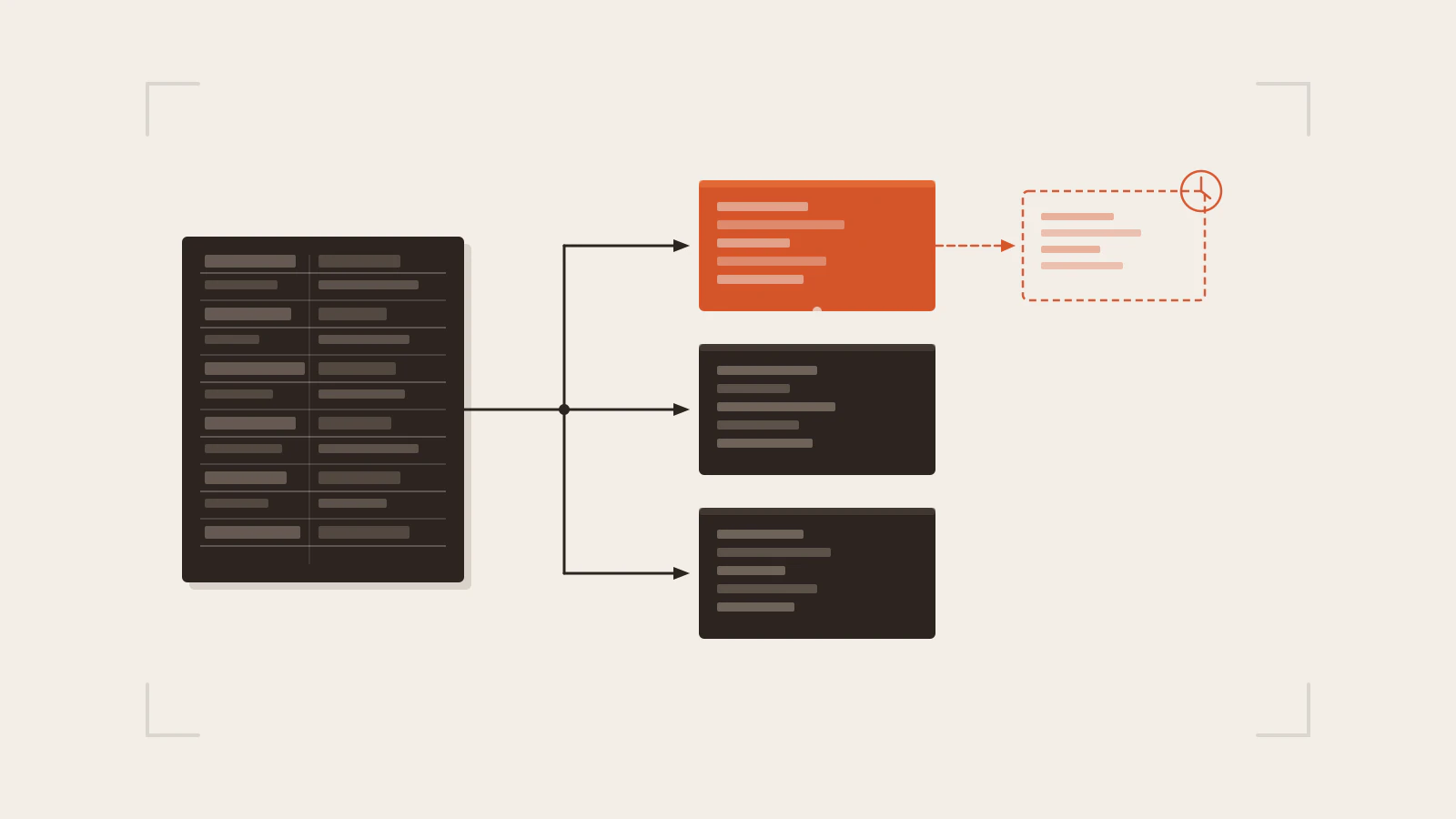
One monolithic bundle splits into purpose-built chunks. Only the first chunk is required before the user sees anything.
What to lazy-load and what to keep eager
The decision that most lazy-loading articles skip: which code to split and which to keep in the initial bundle.
Keep eager:
- The routing shell — navigation, layout wrapper, authentication guard
- Authentication flows — if the login screen is behind a lazy chunk, logged-out users will see a blank page while it loads
- Components above the fold on the first route users land on
- Error boundaries — they must be available before any lazy component can fail
Lazy-load:
- Every route that isn’t the landing route
- Charting libraries (often 200–400 KB on their own)
- Rich text editors
- Date pickers with large locale datasets
- Admin and settings pages that most users rarely visit
- PDF generation and export utilities
There’s one failure mode worth calling out: the waterfall trap. If a lazy component is the only thing that can trigger its own data fetch, you end up with this sequence in series: render page → load component chunk → start data fetch → show data. That’s two network round trips where the second can’t start until the first finishes. If a lazy component loads data in a useEffect, consider whether you can start that fetch before the chunk arrives — React Router’s loader API and frameworks like Next.js handle this automatically for route-level data.
| Code | Strategy | Reason |
|---|---|---|
| Navigation and layout shell | Eager | Needed before first paint |
| Landing route | Eager | First thing users see |
| Auth guard and login page | Eager | Must be available before any route renders |
| Settings, admin, reports | Lazy by route | Most users rarely navigate here |
| Rich text editor | Lazy on interaction | Large; only needed when user edits |
| Charting library | Lazy by route | Can dominate bundle size alone |
| PDF / export utility | Lazy on demand | Only needed when user triggers export |
Next.js dynamic(): the same pattern with extra options
In Next.js, next/dynamic is a composite of React.lazy and Suspense. The split mechanism is identical — it still calls import() under the hood. The difference is the extra options it exposes.
import dynamic from 'next/dynamic';

const HeavyChart = dynamic(() => import('./HeavyChart'), {
  loading: () => <ChartSkeleton />,  // replaces a separate Suspense boundary
  ssr: false,                         // skip server-side rendering for this component
});
Two behaviours worth knowing:
ssr: false tells Next.js to skip prerendering the component on the server. Without this option, Client Components that use dynamic() are prerendered by default — that’s generally what you want, because it gives users HTML to look at while the JavaScript chunk loads. Use ssr: false only for components that depend on browser APIs unavailable during server rendering: window, document, canvas, WebGL, and similar.
Server Components are code-split automatically in Next.js. You don’t need dynamic() for them. Lazy loading with dynamic() applies specifically to Client Components, where you control when the JavaScript runs on the client.
The loading option is slightly more convenient than wrapping each component in its own Suspense. Otherwise the pattern and the tradeoffs are the same as plain React.lazy. If you’re starting with the App Router itself, Getting Started with Next.js App Router covers the routing setup you’d apply this on top of.
Split deliberately, not reflexively
The mental shift that makes code splitting productive: treat it as a load-budget decision, not a performance checkbox.
Before splitting anything, open your bundle report and find what’s actually large. Then check which of those modules are needed before the first paint versus later. Route-based splitting is almost always the right first move because routes already map to user journeys — they’re not arbitrary implementation boundaries.
Keep the routing shell, auth layer, and above-the-fold content in the initial bundle. Split routes, heavy libraries, and features users navigate to explicitly. And watch for the waterfall: a lazy chunk that triggers its own data fetch adds latency in a way that eager code never would.
The Profiler from React Performance: Finding and Fixing Slow Components tells you which components are slow at runtime. The bundle report tells you which modules are large before the user even interacts. Use both — they answer completely different questions.