Building a GitHub Actions Pipeline for a Node.js App
I walk through building a GitHub Actions pipeline for a Node.js app — triggers, install steps, npm ci, caching node_modules, and environment secrets.
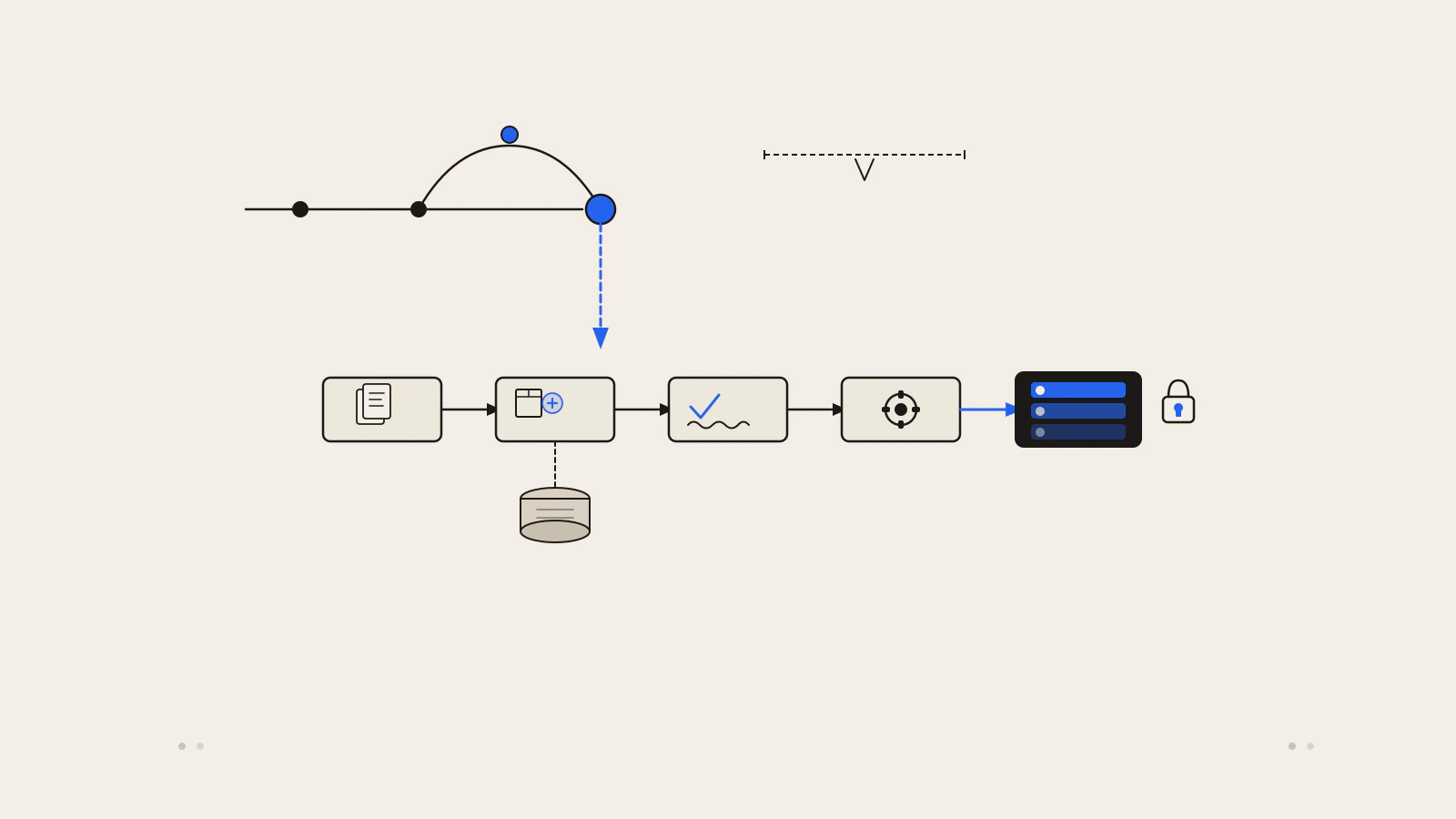
You push a fix, it works on your machine, it ships. Two days later someone reports the change broke the API for authenticated users — and the unit tests that would have caught it weren’t wired to run anywhere except locally, on request.
The CI pipeline doesn’t write your tests. It does something narrower but critical: it runs them on every push, without anyone asking it to. By the time a pull request gets reviewed, the checks have already run. If something fails, the reviewer sees it before they merge.
This post builds a complete GitHub Actions workflow for a Node.js project: what triggers it, what each step does, how to cache installs, and how to wire environment secrets for a deploy step. If you’re already comfortable with branching — the kind of workflow covered in A Practical Git Branching Workflow for Small Teams — this is the natural next layer on top.
Quick answer: Create
.github/workflows/ci.yml. Seton: [push, pull_request]for the triggers, useactions/checkout@v6to get the code,actions/setup-node@v7withcache: 'npm'to set up Node.js, then runnpm ci, your test script, your lint script, and your build. Secrets stored in repository settings are referenced with${{ secrets.SECRET_NAME }}.
On this page
- What the finished workflow does
- The trigger: when the workflow runs
- The steps: checkout, install, test, lint, build
- Caching installs to cut run time
- Environment secrets for a deploy step
- What breaks and why
- The pipeline only catches what you test
What the finished workflow does
Before drilling into each part, here is the complete workflow file. It lives at .github/workflows/ci.yml in your repository:
name: CI

on:
  push:
    branches: [main]
  pull_request:
    branches: [main]

jobs:
  ci:
    runs-on: ubuntu-latest

    steps:
      - name: Checkout code
        uses: actions/checkout@v6

      - name: Set up Node.js
        uses: actions/setup-node@v7
        with:
          node-version: "20"
          cache: "npm"

      - name: Install dependencies
        run: npm ci

      - name: Run tests
        run: npm test

      - name: Run linter
        run: npm run lint

      - name: Build
        run: npm run build
Each part of this file has a reason for being exactly where it is. The sections below explain what each piece does and what happens when something goes wrong.
The trigger: when the workflow runs
The on: block tells GitHub when to start this workflow. The two events here cover the moments that matter most:
on:
  push:
    branches: [main]
  pull_request:
    branches: [main]
push runs the pipeline whenever a commit lands on main. pull_request runs it whenever a PR is opened, updated, or synchronised against main. The second one is what makes the pipeline useful during review — the checks appear directly on the PR before anyone merges.
If you want the pipeline to run on every branch, remove the branches filter:
on: [push, pull_request]Running on all branches catches problems earlier but costs more CI minutes. Most projects run the full suite on PRs targeting main, and sometimes a lighter check on every push to any branch.
One detail worth knowing: if you push directly to main, both the push trigger and any open PRs targeting main each start a separate run. That’s expected — they’re different events and can give you slightly different results if the branch state differs.
The steps: checkout, install, test, lint, build
Each step in the steps: list runs in sequence. A failing step aborts the job, so the pipeline fails fast: if tests fail, lint and build don’t run. That keeps feedback time short.
Checkout is always first. Without it, the runner has no code to work with:
- name: Checkout code
  uses: actions/checkout@v6
Setup Node.js runs immediately after. Pinning node-version means the pipeline doesn’t depend on whatever version happens to be installed on the runner that day:
- name: Set up Node.js
  uses: actions/setup-node@v7
  with:
    node-version: "20"
    cache: "npm"
The cache: 'npm' line is doing something specific here — more on this in the next section.
Install with npm ci, not npm install. This is the one that surprises people setting up CI for the first time:
- name: Install dependencies
  run: npm ci
npm ci deletes node_modules, reads package-lock.json, and installs exactly what the lock file specifies. It fails if the lock file is missing or out of sync with package.json. npm install would update the lock file if it found a mismatch — meaning your CI run might be installing different versions than your local environment. npm ci prevents that entirely.
Test, lint, and build map directly to the scripts in your package.json:
- name: Run tests
  run: npm test

- name: Run linter
  run: npm run lint

- name: Build
  run: npm run build
Order matters. Tests validate logic, lint validates style, and the build validates the compiled output. Running in this order means you get the most actionable failure first — a failing test tells you more than a lint warning about variable naming.
If your project structure has grown beyond a single app.js, the structure described in Structuring a Production-Ready Express Project will have separate service layers that are easier to test independently. That separation pays off here.
Check this before moving on
- Your
package.jsonhastest,lint, andbuildscripts defined - A
package-lock.jsonexists and is committed —npm cifails without it - The workflow file is at
.github/workflows/ci.yml— GitHub won’t find it anywhere else
Caching installs to cut run time
Without caching, npm ci downloads every package from the registry on every single run. For a project with 50 dependencies that’s often 30–60 seconds of network time, every run.
The cache: 'npm' input on setup-node tells the action to cache npm’s local package store (the ~/.npm directory on the runner). The next run restores that cache before npm ci executes. Since npm ci reads packages from the local store when available, most installs happen from disk instead of the network.
This is worth understanding clearly: it doesn’t cache node_modules between runs. It caches the underlying package store. npm ci still deletes and rebuilds node_modules from that store on every run — which is what keeps installs reproducible. The speed gain comes from skipping the network fetch, not from skipping the install itself.
The cache key is derived automatically from the hash of package-lock.json. When the lock file changes (you added a dependency), the cache is invalidated and a fresh download runs. When it hasn’t changed, the cached store is used and the install is significantly faster.
If your project uses Yarn, change cache: 'npm' to cache: 'yarn'. For pnpm, use cache: 'pnpm'.
Environment secrets for a deploy step
Once CI passes, you often want to trigger a deploy. Deploy steps need credentials — API keys, SSH keys, server addresses — and hardcoding those in the workflow file would expose them to anyone with read access to the repository.
GitHub provides repository secrets for this. In your repository settings under Settings > Secrets and variables > Actions, you create a secret — for example DEPLOY_API_KEY — and GitHub encrypts it at rest. The value is never visible in the UI after you save it.
In the workflow, you reference it through the secrets context:
- name: Deploy
  env:
    DEPLOY_API_KEY: ${{ secrets.DEPLOY_API_KEY }}
  run: ./scripts/deploy.sh
The secret value is masked in the run logs. If the script prints it accidentally, GitHub replaces it with ***.
For a real production deploy, you’ll want to separate the deploy job and gate it on the CI job passing:
jobs:
  ci:
    runs-on: ubuntu-latest
    steps:
      # ... checkout, install, test, lint, build

  deploy:
    needs: ci
    runs-on: ubuntu-latest
    environment: production
    steps:
      - name: Checkout code
        uses: actions/checkout@v6

      - name: Deploy
        env:
          DEPLOY_API_KEY: ${{ secrets.DEPLOY_API_KEY }}
        run: ./scripts/deploy.sh
The needs: ci line means the deploy job only starts after the ci job succeeds. The environment: production line ties the job to a named deployment environment, which lets you add protection rules — such as requiring a manual approval before the job runs — directly in repository settings.
Repository secrets and environment secrets are separate things. Repository secrets are available to all workflows. Environment secrets are scoped to a specific named environment and can require a reviewer to approve each deployment.
What breaks and why
Missing package-lock.json — npm ci exits immediately if the lock file isn’t in the repository. A lot of projects have package-lock.json in .gitignore because someone added it early and never removed it. Check your ignore file and commit the lock file.
Wrong Node.js version — If your code uses a feature from Node 20 and the workflow pins node-version: '18', the build fails in a way that doesn’t happen locally. Pin the same major version your production environment uses.
No test script defined — npm test exits with a non-zero code if package.json has no test script. GitHub Actions treats any non-zero exit code as a step failure. A project with no tests yet should either define a script that exits successfully or skip the test step explicitly.
Lint config not committed — Linters pick up different config files depending on where they run. If your configuration extends a local file that isn’t committed to the repository, lint will fail on the runner but pass locally. All config files the linter needs must be tracked in git.
Secrets unavailable on forked PRs — For security reasons, repository secrets are not available to workflows triggered by pull requests from forks. If you accept external contributions, your deploy step needs to either skip gracefully or use a separate workflow triggered after merge.
| Failure symptom | Likely cause | First thing to check |
|---|---|---|
npm ci exits immediately |
No package-lock.json |
Check .gitignore, commit the lock file |
| Tests pass locally, fail in CI | Node version mismatch | Match node-version to your local version |
| Lint fails only in CI | Config file not committed | Check all lint config files are in git |
| Deploy runs before tests pass | No needs on deploy job |
Add needs: ci to the deploy job |
The pipeline only catches what you test
The workflow YAML is the easy part. What determines whether CI is actually useful is the quality of the test suite it runs.
A pipeline that runs npm test and finds zero tests passes on every push, flags no regressions, and gives the team a false sense that things are checked. The green checkmark means “the workflow ran” — not “the code works.”
Think of it this way: the pipeline is the mechanism, and the tests are the policy. The mechanism takes an afternoon to set up. The policy — deciding what to test, writing those tests, maintaining them as the code changes — is the ongoing work.
Start with what you have. Wire up the pipeline now so the infrastructure exists, even if the test suite is thin. Then add tests incrementally, starting with the behaviour that has broken before. If you’re building on an Express API like the one described in Building a REST API with Node.js and Express, route handlers are a practical first target for integration tests.
The pipeline doesn’t make your code reliable. The tests do. The pipeline just makes sure they run.
The full pipeline: each push triggers the sequence from checkout through to build, with the cache cutting install time and secrets gating the deploy step.